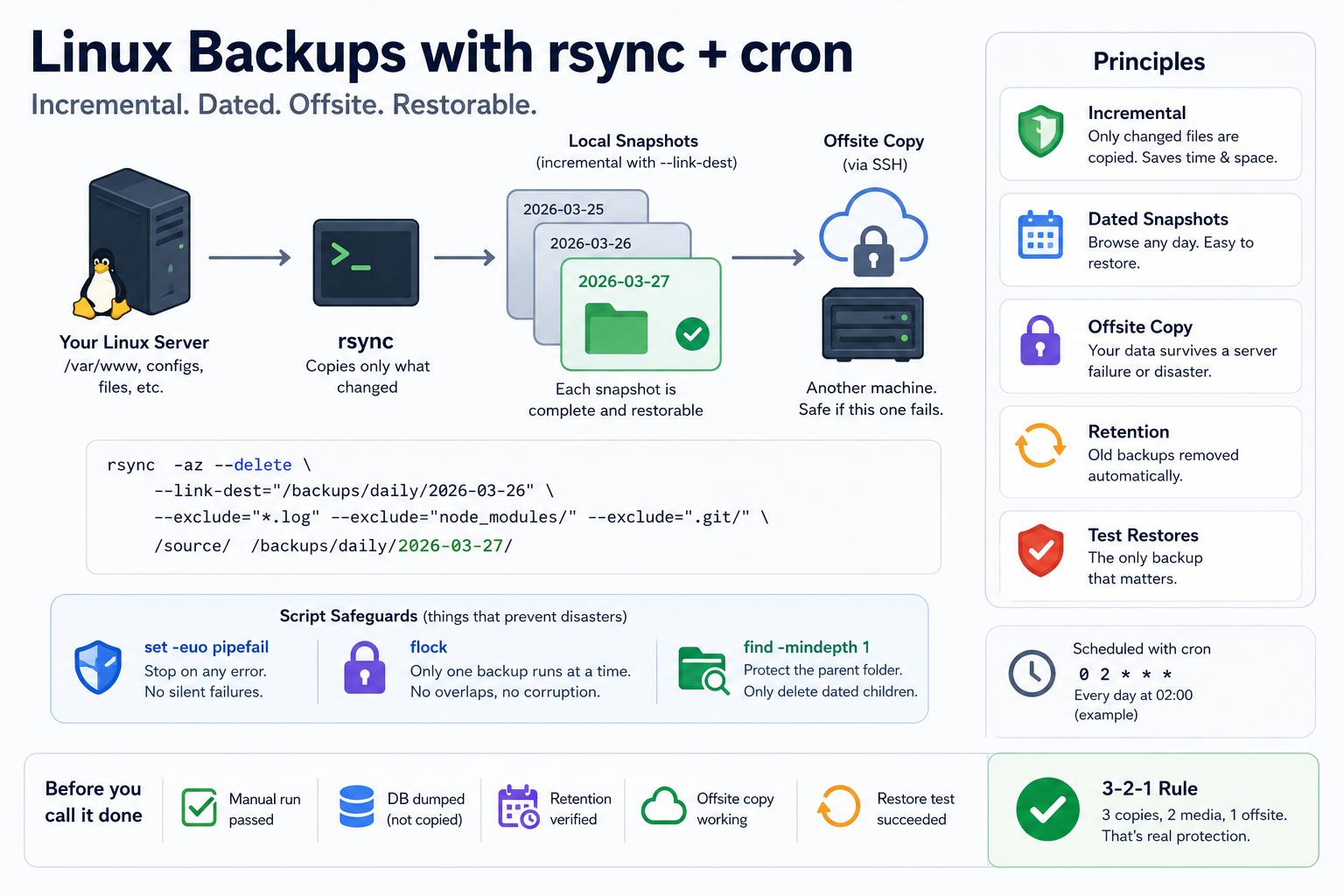
Too many production servers run with no real backup, only the vague belief that nothing will go wrong. Then a bad rm -rf, a failing disk, or a migration gone sideways takes the lot, and the recovery plan turns out to be a hope. On Linux you do not need a backup product for this. rsync and cron will get you dated, incremental, offsite snapshots that actually restore, and the whole thing fits in one script. What follows is that script, plus the sharp edges that cut you if you copy a tutorial without understanding it.
Why rsync, and the one flag that will bite you
rsync copies only what changed since the last run. No full re-copy every night, which saves time and bandwidth and is the reason it scales past a toy dataset.
rsync [options] source/ destination/
The options that matter:
| Option | What it does |
|---|---|
-a | Archive mode: preserves permissions, timestamps, symlinks |
-z | Compresses in transit (worth it over a network, not locally) |
--delete | Removes files at the destination that are gone from the source |
--link-dest | Hard-links unchanged files against a previous backup (see below) |
--exclude | Skips paths you do not want (node_modules/, .git/, logs) |
-e ssh | Transfers over SSH |
Two traps live in this table. First, --delete mirrors deletions, so if your source path is wrong, or the source disk is unmounted and the directory is empty, rsync will faithfully empty your backup to match. Second, the trailing slash is not decoration: source/ copies the contents of source, while source (no slash) copies the directory itself into the destination. Getting that wrong is how people nuke or nest their backups. Say the paths out loud before you add --delete.
Dated snapshots without paying for full copies
The naive approach copies everything into a fresh dated folder every day. That works and wastes a fortune in disk, because yesterday's unchanged files get written again. --link-dest fixes it: unchanged files become hard links to the previous snapshot, so each dated directory looks like a full backup but only the changed files cost real space.
rsync -a --delete \
  --link-dest="/backups/daily/$YESTERDAY" \
  "$SOURCE" "/backups/daily/$TODAY/"
Now /backups/daily/2026-03-27/ is browsable as a complete tree, restores like a full backup, and costs the size of one day of changes. This is the single upgrade that separates a real backup rotation from a disk-eating cron job.
The script
#!/bin/bash
set -euo pipefail   # fail on error, unset var, or broken pipe. Non-negotiable.

# --- config ---
SOURCE="/var/www/"
BACKUP_ROOT="/backups"
DATE=$(date +"%Y-%m-%d")
DOW=$(date +"%u")        # 1=Mon ... 7=Sun
DOM=$(date +"%d")
LOG="/var/log/backup.log"

# --- one run at a time: refuse to overlap a previous, slow run ---
exec 9>/var/lock/backup.lock
flock -n 9 || { echo "[$DATE] another backup is still running, skipping" >> "$LOG"; exit 0; }

# --- pick the tier ---
if   [ "$DOM" = "01" ]; then TIER="monthly"
elif [ "$DOW" = "7"  ]; then TIER="weekly"
else                         TIER="daily"
fi

DEST="$BACKUP_ROOT/$TIER/$DATE"
PREV=$(ls -1d "$BACKUP_ROOT/$TIER"/*/ 2>/dev/null | tail -1)  # last snapshot, if any
mkdir -p "$DEST"

echo "[$DATE] starting $TIER backup" >> "$LOG"

rsync -az --delete \
  ${PREV:+--link-dest="$PREV"} \
  --exclude="*.log" --exclude="node_modules/" --exclude=".git/" \
  "$SOURCE" "$DEST/" >> "$LOG" 2>&1

echo "[$DATE] $TIER backup OK -> $DEST" >> "$LOG"

# --- retention: note -mindepth 1 (see below) ---
find "$BACKUP_ROOT/daily"   -mindepth 1 -maxdepth 1 -type d -mtime +7  -exec rm -rf {} +
find "$BACKUP_ROOT/weekly"  -mindepth 1 -maxdepth 1 -type d -mtime +28 -exec rm -rf {} +
find "$BACKUP_ROOT/monthly" -mindepth 1 -maxdepth 1 -type d -mtime +90 -exec rm -rf {} +

echo "[$DATE] cleanup done" >> "$LOG"
Three things in there are not in the average tutorial and are exactly what stops this script from betraying you:
set -euo pipefail. Without it, a failedrsyncstill lets the script march on to the cleanup step and delete old backups anyway. So a broken backup run quietly prunes your good ones. With it, the script stops the moment something fails.flock. Cron does not care that last night's backup is still running on a big dataset. Two overlappingrsyncruns against the same destination corrupt each other. The lock makes a slow run skip the next tick instead of colliding.find ... -mindepth 1. This is the bug hiding in most copy-pasted retention lines.find /backups/daily -maxdepth 1 -type dmatches/backups/dailyitself, and if that directory is old enough,-mtime +7will happilyrm -rfthe entire tier.-mindepth 1excludes the parent so you only ever delete dated children.
Make it executable:
sudo chmod +x /usr/local/bin/backup.sh
Databases need a dump, not a file copy
Copying the raw data directory of a running database gives you a corrupt, unrestorable mess. Dump it to SQL first, then let rsync carry the dump:
# PostgreSQL
pg_dump -U postgres mydb > "$DEST/db.sql"

# MySQL / MariaDB
mysqldump mydb > "$DEST/db.sql"
Do not put a database password in the script. For MySQL, put it in ~/.my.cnf (mode 600) and let the client read it:
[client]
user=root
password=your_password
Schedule it, but test it first
An untested backup is not a backup, it is a guess. Run it by hand and read the output before you trust cron with it:
sudo /usr/local/bin/backup.sh
ls /backups/daily/ && tail -20 /var/log/backup.log
Only then schedule it. Edit root's crontab (sudo crontab -e) and add:
0 2 * * * /usr/local/bin/backup.sh
| Cron | Runs |
|---|---|
0 2 * * * | every day at 02:00 |
0 3 * * 0 | every Sunday at 03:00 |
0 1 1 * * | the 1st of each month at 01:00 |
Offsite, because a local backup dies with the machine
A backup on the same box as the data is not a backup; a failed disk or a compromised host takes both. Push it to another machine over SSH with key auth, so the script runs unattended:
ssh-keygen -t ed25519 -C "backup-key"     # leave the passphrase empty
ssh-copy-id -i ~/.ssh/id_ed25519.pub user@REMOTE
Then target the remote in the script:
rsync -az -e "ssh -i ~/.ssh/id_ed25519" --delete "$SOURCE" \
  "user@REMOTE:/backups/$TIER/$DATE/"
A one-line report after each run tells you it is still working, which matters because the failure mode of backups is silence:
tail -1 "$LOG" | mail -s "[backup] $DATE" you@example.com
The test that actually counts: restoring
Backups fail silently; restores fail loudly, usually at the worst moment. So rehearse the restore in a throwaway environment before you need it for real:
# whole tree
rsync -av /backups/daily/2026-03-27/ /var/www/mysite/

# database
psql -U postgres mydb < /backups/daily/2026-03-27/db.sql     # PostgreSQL
mysql mydb < /backups/daily/2026-03-27/db.sql                # MySQL/MariaDB
If you have never restored from a backup, you do not have backups, you have files you hope are backups.
Before you call it done
set -euo pipefail,flock, and-mindepth 1are all in the script- manual run passed and the log is readable
- the database is dumped, not file-copied, and credentials are out of the script
- retention is doing what you think it is (check after a week)
- one copy lives on another machine
- you have restored from it at least once, on purpose
That last point is the 3-2-1 rule in practice: three copies, on two kinds of media, one of them offsite. It is not paranoia, it is the difference between an incident and a disaster.